Hermes Agent Integration
Use any model with Hermes Agent through doteb. One config change, full cost tracking, 210+ models.
Hermes Agent is an AI coding agent for your terminal built by Nous Research. It supports tool use, browser automation, multi-provider routing, skills, and MCP servers. By pointing it at doteb you get access to 210+ models from 60+ providers, all tracked in one dashboard.
One config change. No code changes. Full cost tracking.
Prerequisites
- Hermes Agent installed — see installation below
- A doteb API key — sign up free (no credit card required)
Installation
Install Hermes Agent using the official package for your environment.
After installation, reload your shell and verify:
1source ~/.bashrc2hermes --version1source ~/.bashrc2hermes --versionThe installer handles Python 3.11, Node.js, ripgrep, and other dependencies automatically. Use the package instructions for your operating system when you need Windows (PowerShell) or manual install options.
Setup
Step 1: Run the Setup Wizard
Run hermes setup to launch the interactive setup wizard. You can choose either Quick setup (option 1) for provider, model, and messaging configuration, or Full setup (option 2) to configure everything including tools, skills, and advanced options:
1hermes setup1hermes setup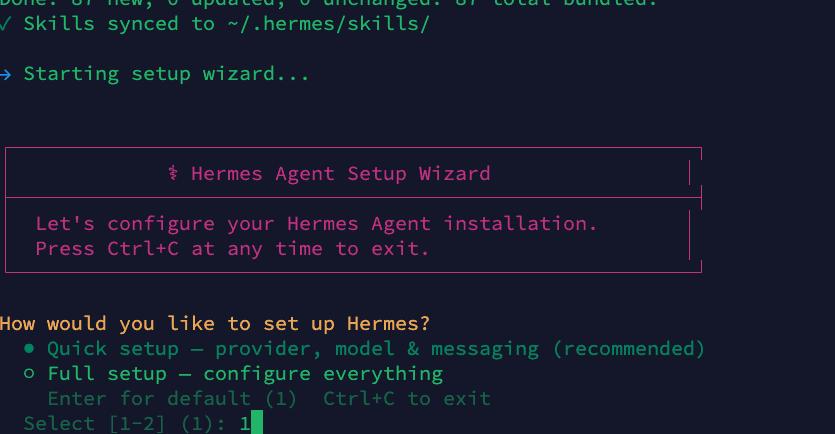
In this guide we use Quick setup, but Full setup works the same way — it just includes additional configuration steps.
Step 2: Configure Inference Provider
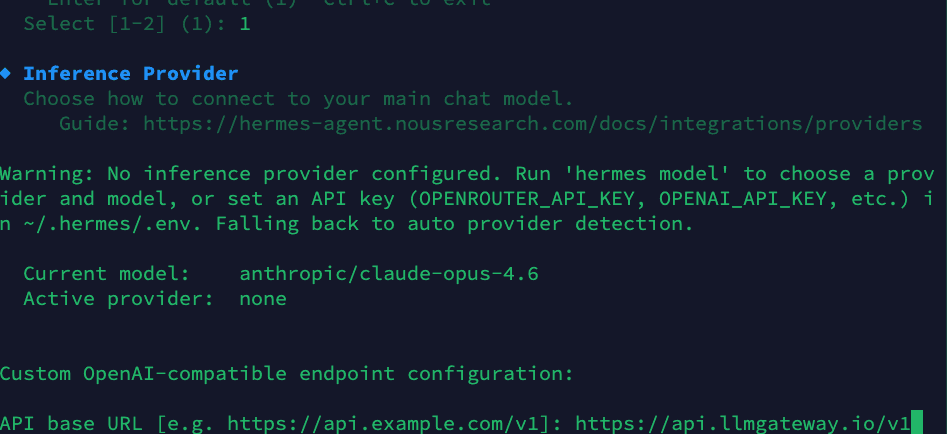
The wizard will ask you to configure your inference provider. Select Custom OpenAI-compatible endpoint and enter the doteb base URL:
1API base URL: https://api.doteb.com/v11API base URL: https://api.doteb.com/v1Then paste your doteb API key (starts with llmgtwy_):
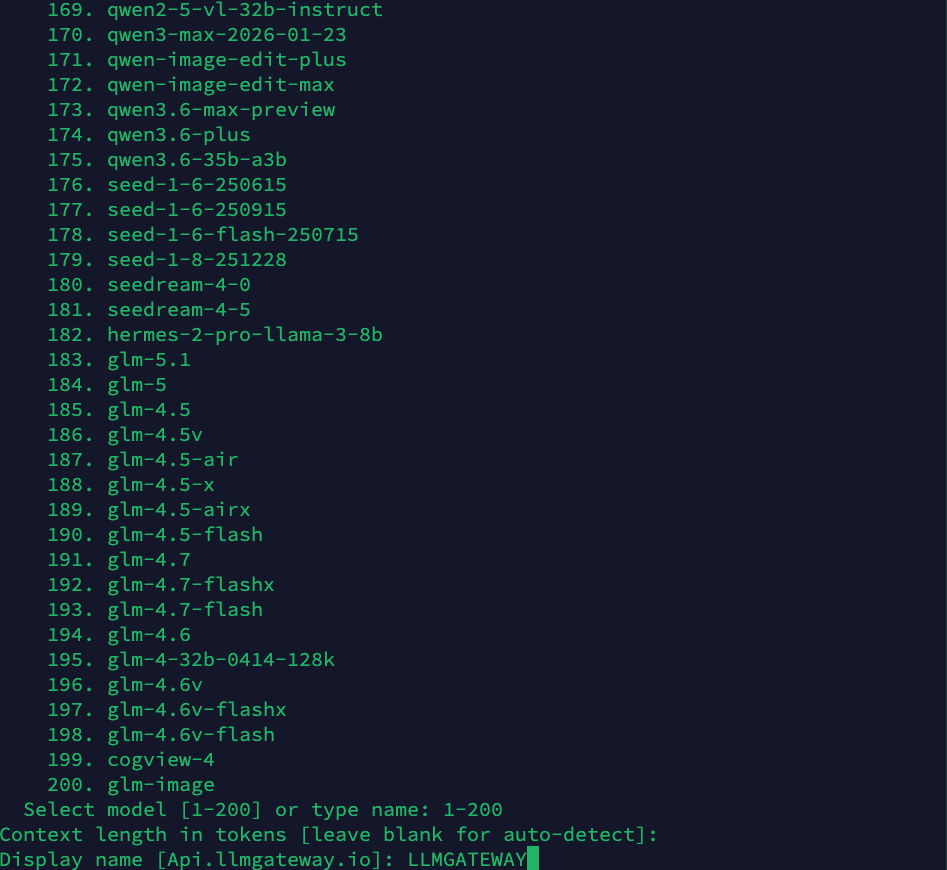
Step 3: Choose a Model
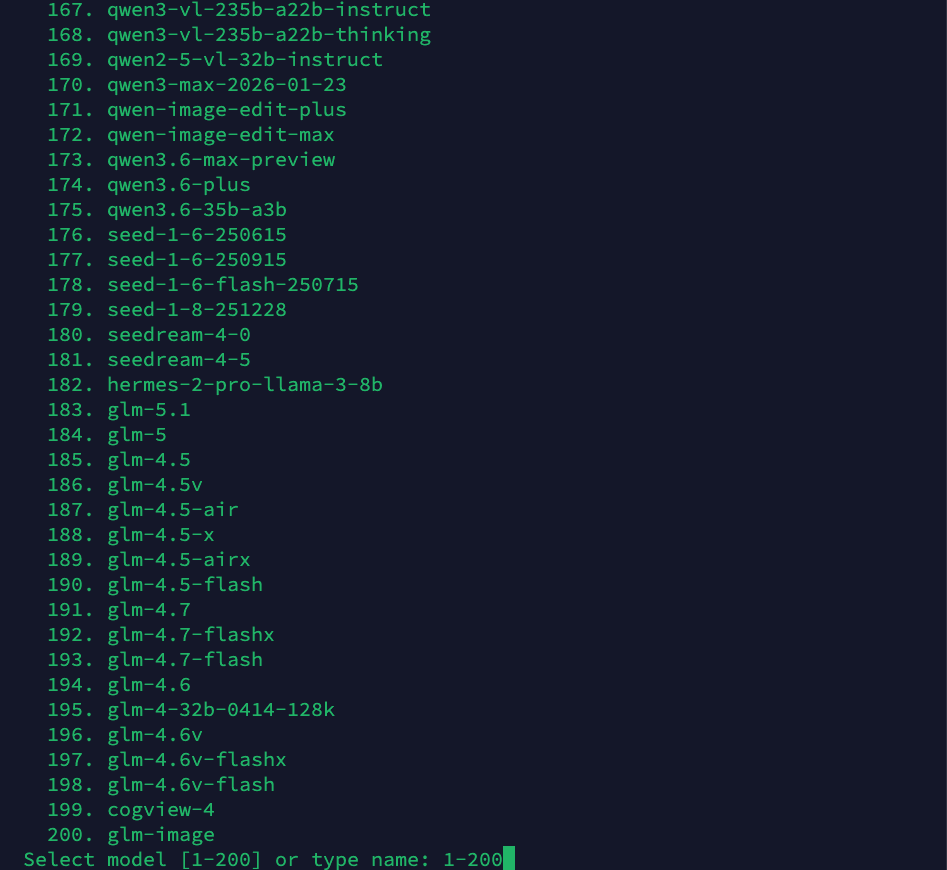
The wizard presents a list of 200+ available models. Type a model name or select from the list. Popular choices include claude-sonnet-4-6, gpt-5.5, or gemini-3.1-pro:
Step 4: Set Context Length
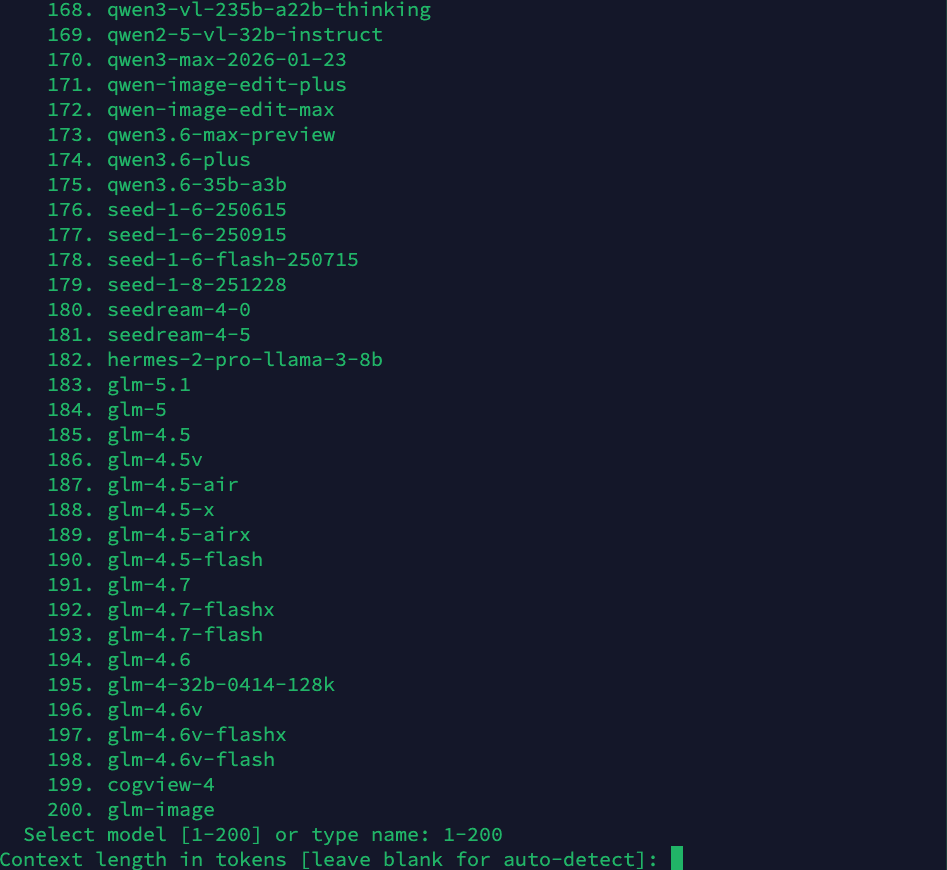
Leave the context length blank to auto-detect (recommended), or specify a custom value:
Step 5: Set Display Name
Give your provider configuration a display name. This appears in the Hermes status bar when chatting:
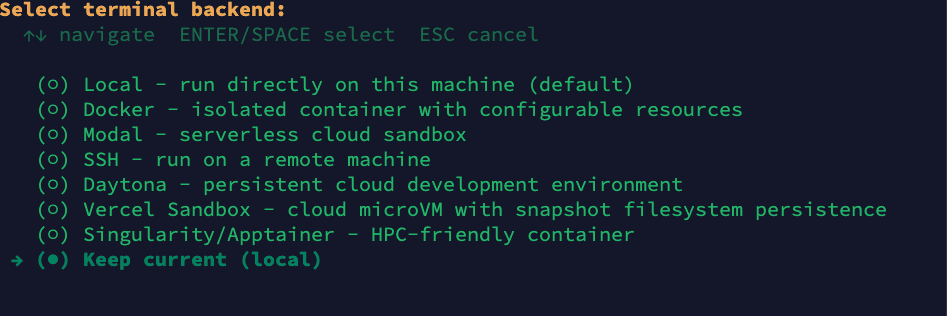
Step 6: Select Terminal Backend
Choose your terminal backend. In this guide we use Local (run directly on this machine), but you can pick any option based on your requirements — Docker for isolated containers, SSH for remote machines, Modal for serverless sandboxes, Daytona for cloud dev environments, and more:
Step 7: Setup Complete
Once done, Hermes shows you where your config files are stored and how to edit them. It will prompt "Launch hermes chat now? [Y/n]" — press Y to start an interactive agent session immediately:
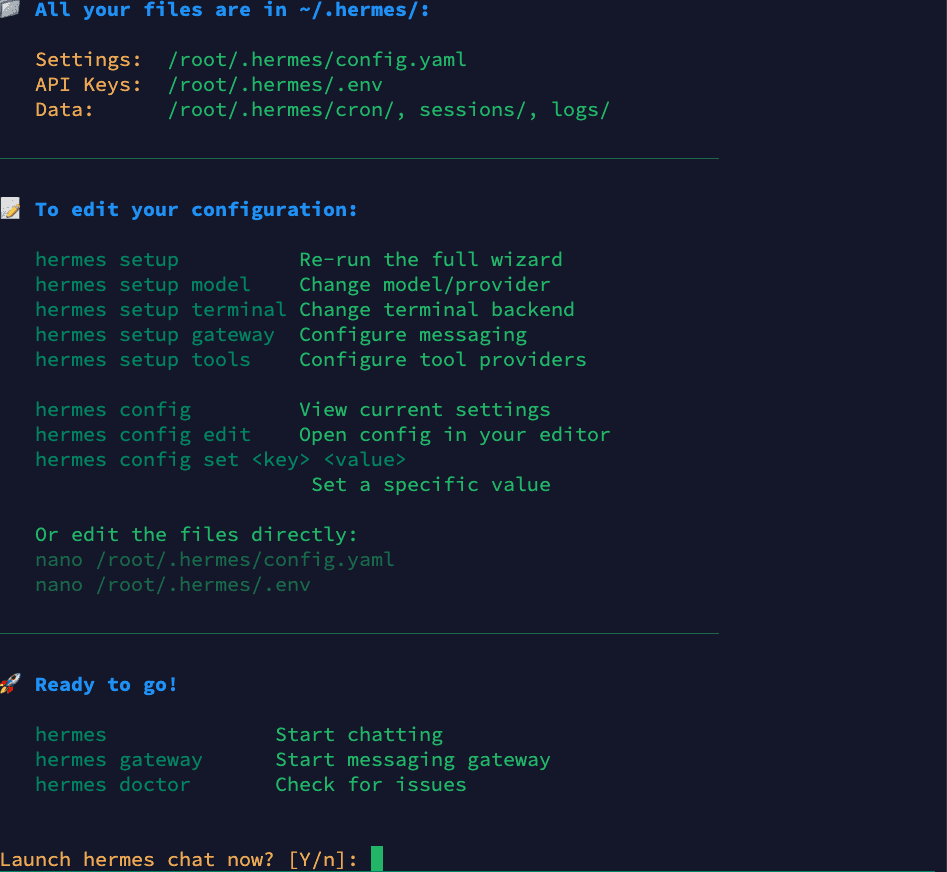
Your configuration files:
- Settings:
~/.hermes/config.yaml - API Keys:
~/.hermes/.env - Data:
~/.hermes/cron/,sessions/,logs/
Once you press Y, Hermes launches a full agent session connected to doteb. You can start chatting right away.
Using Hermes with doteb
Once configured, all requests route through doteb. You'll see the provider name (e.g., "LLMGATEWAY") in the Hermes status bar.
Switching Models at Runtime
You can switch models mid-session using the /model slash command (similar to how Claude Code uses slash commands). Just type /model followed by the model name:
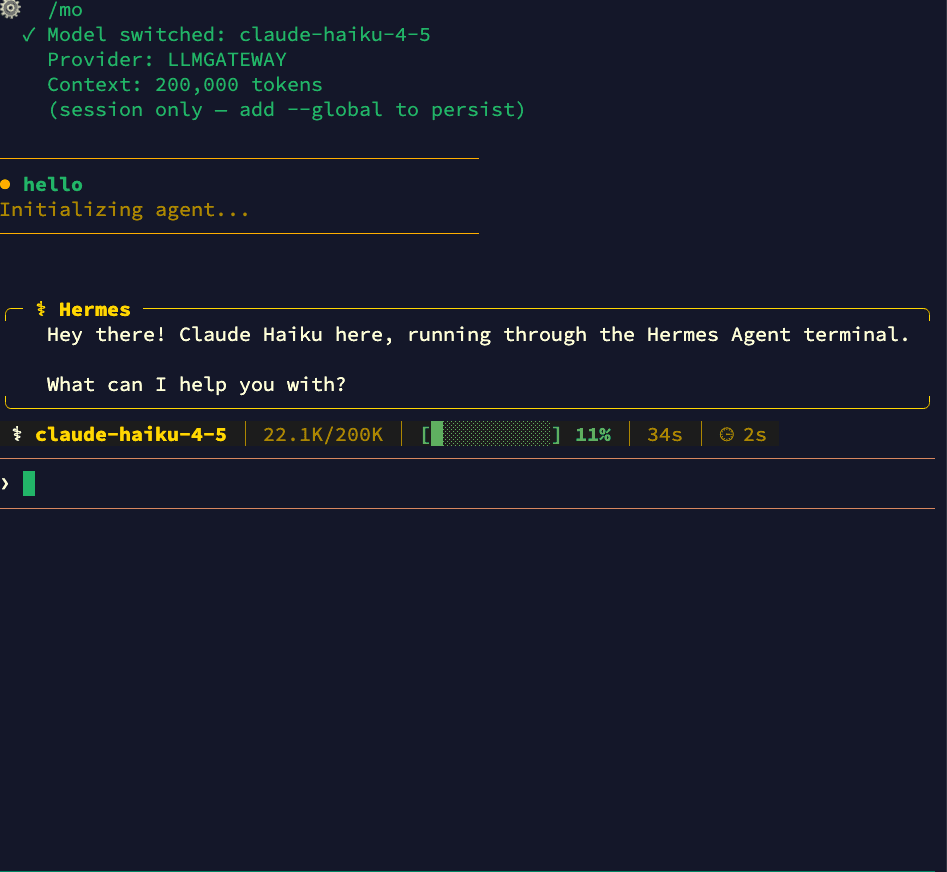
Switch to any model available through doteb — from Claude to GPT to open-source models — without leaving your session:
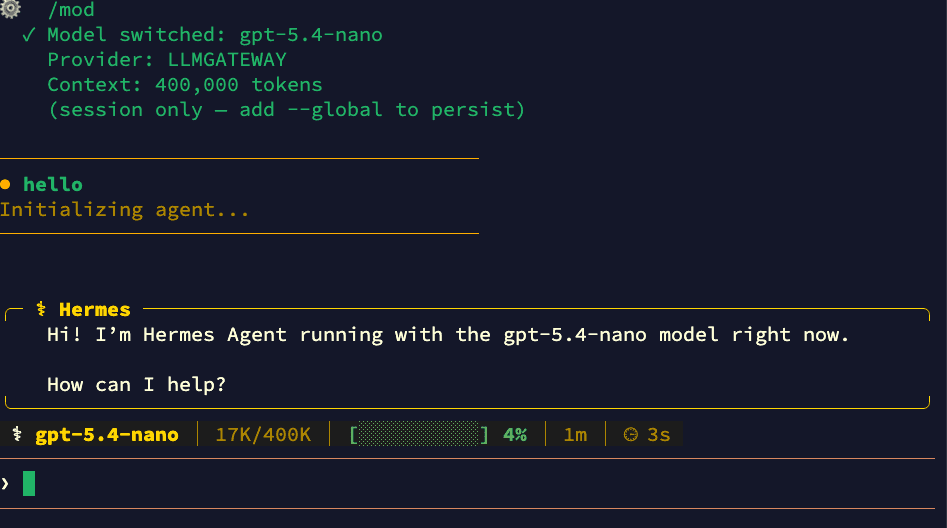
Add --global to persist the model change across sessions.
CLI Model Override
You can also override the model from the command line:
1# Use a specific model for this session2hermes chat --model gpt-5.53
4# Use a powerful model for complex tasks5hermes chat --model claude-opus-4-61# Use a specific model for this session2hermes chat --model gpt-5.53
4# Use a powerful model for complex tasks5hermes chat --model claude-opus-4-6Why Use doteb with Hermes Agent
- 210+ models — Claude, GPT, Gemini, Llama, DeepSeek, and more
- One API key — Stop managing separate keys for each provider
- Cost tracking — See exactly what each session costs in your dashboard
- Response caching — Repeated requests hit cache automatically
- Automatic fallback — If a provider is down, requests route to an alternative
- Volume discounts — Check discounted models for savings up to 90%
One-Shot Mode
For scripting or CI pipelines, use the -q flag for a one-shot prompt:
1hermes chat -q "Explain what this function does" -Q1hermes chat -q "Explain what this function does" -QThe -Q flag enables quiet mode, suppressing the banner and spinner for clean output. For pure one-shot mode (no interactive session):
1hermes chat -z "Generate a README for this project"1hermes chat -z "Generate a README for this project"Useful Hermes Commands
| Command | Purpose |
|---|---|
hermes | Start interactive chat (default) |
hermes setup | Run the setup wizard |
hermes setup model | Change model/provider |
hermes chat -q "..." | One-shot prompt |
hermes model | Choose provider and model interactively |
hermes config edit | Open config in your editor |
hermes doctor | Diagnose connection/config issues |
hermes sessions | Browse and manage past sessions |
hermes --continue | Resume most recent session |
hermes update | Update to latest version |
Locking to a Specific Provider
By default, doteb automatically fails over to alternative providers if your chosen provider is experiencing downtime. To disable fallback and always route to one provider, add the header via Hermes's request configuration.
Disabling fallback means requests will fail if the chosen provider is down. See the routing docs for details.
Troubleshooting
Model not found
If you get a "model not supported" error, check that your model ID matches exactly what's listed on the models page. Model IDs are case-sensitive.
Connection timeout
Verify your base_url is set to https://api.doteb.com/v1 (note the /v1 at the end). You can also check the HERMES_API_TIMEOUT environment variable if you're hitting timeouts on long-running requests.
Authentication errors
Make sure your api_key starts with llmgtwy_ and is valid. Check your dashboard to confirm the key is active.
Diagnosing issues
Run hermes doctor to check your configuration, connectivity, and credentials:
1hermes doctor1hermes doctorOld config overrides
If you previously used a different provider (e.g., OpenRouter), make sure to update both provider and base_url fields. The provider must be set to "custom" for doteb. Also check ~/.hermes/.env for any leftover OPENROUTER_API_KEY or other provider keys that might take precedence.
Get Started
Ready to run Hermes Agent on any model? Sign up for doteb and grab your API key.
Questions? Check our docs.